
We’ve reached the final milestone in our Optimism RFG: UI for Smart Contracts journey. After months of research and development, the OKcontract team is wrapping up with a new open-source library called ABI2UI. This project began with the goal of simplifying interactions with smart contract ABIs while preserving decentralization.
We previously released OKcontract UI Components and fred, a functional reactive editor.
OKcontract’s ABI2UI Proposal
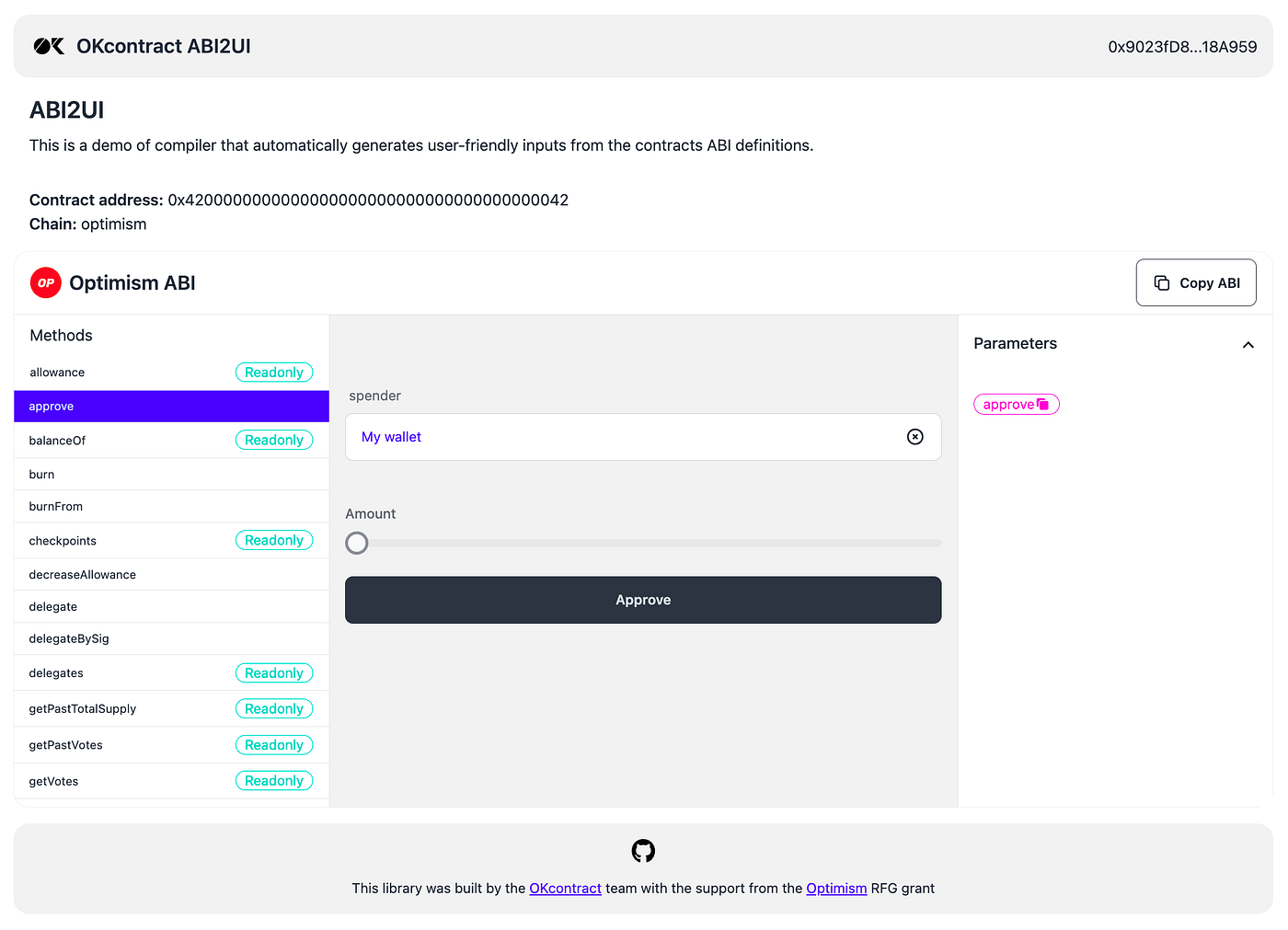
Our approach is called ABI2UI: an automated user interface generator for smart contracts that reads a smart contract ABI and spins up a functional interface. The design revolves around:
- Universality: Apply the tool to any smart contract ABI.
- Scalability: Address the growing needs of the Optimism ecosystem.
- User-Friendly Interface: Enter a contract address or ABI, view functions, and input parameters with readable formatting.
- Integer Conversions: Automatically detect denominators.
- Customizability: Generate UI components from constraint definitions without having to manually place elements.
Our goal: make smart contracts accessible for builders and non-technical users, reducing friction while maintaining decentralization.
Introducing ABI2UI
The ABI2UI repository holds a sample Svelte application that displays graphically the ABI for a given contract, autogenerates the UI and allows to interact or read from all methods. Users can connect to a contract, browse its functions, send transactions, and review outputs in a matter of clicks. All of this happens through the OKcontract stack:
- cells manages reactive state
- fred deals with structured data edits
- multichain simplifies multi-chain operations
- OKcontract SDK offers a cohesive developer experience
Getting Started
npm i
npm run dev
Switching Contracts
You can set a contract via an OKcontract identifier, found in the OKcontract Hub. Alternatively, you can choose a contract by its address using the identifier con:@{chain}/{0x...} where chain is the chain ID on OKcontract (e.g. optimism) and 0x... the contract address. For example, use con:@optimism/0x... to specify a contract on Optimism.
Design & Philosophy
We want to reduce the overhead of spinning up a default front end for any contract. The tool connects to a permissionless network without API keys, so developers can jump right into exploring, testing, and building out decentralized applications.
Looking Ahead
Although this milestone marks the end of our Optimism RFG journey, our work continues. We see ABI2UI as a stepping stone toward broader decentralization, greater accessibility, and a welcoming developer experience on OP Mainnet.
- Try It: Check out the ABI2UI GitHub repo to see how it works.
- Learn more: For more details, documentation, and examples visit docs.okcontract.com/sdk.
- Check out OKcontract Interactions Hub: Explore smart contracts and ready-to-use interactions on Optimism on https://app.okcontract.com/
We’re grateful for the support of the Optimism Foundation and look forward to refining this tool. With ABI2UI, interacting with smart contracts becomes simpler for those who want to build and experiment on OP Mainnet.